



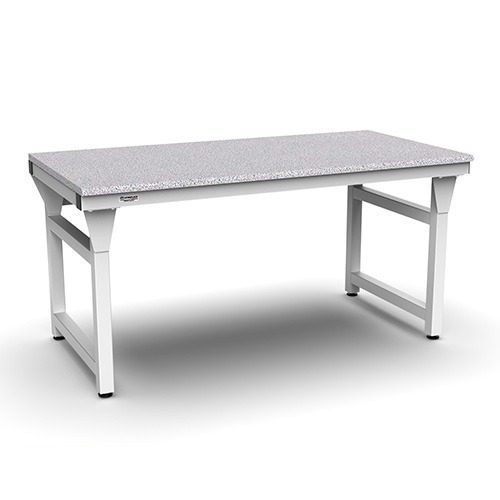
Choosing an industrial workbench is a specification decision, not a quick selection from a catalog. The frame must support the equipment, tooling, and forces involved, while the surface, height, utilities, and footprint must fit the work process and the facility.
A heavy duty workbench is appropriate when its construction and configuration are matched to the application. Evaluate total and point loads, vibration, ergonomics, environmental requirements, access, and future service needs together rather than treating weight capacity as the only criterion.
Talk to a Design Specialist to discuss the work cell requirements and determine whether a standard configuration or custom solution fits.
That approach gives engineers and facility planners a defensible basis for comparing standard and custom solutions. Workplace Modular Systems designs, engineers, manufactures, and installs industrial workstations for production, research, laboratory, and high-tech manufacturing environments, so the specification can account for the complete installation. Start with the construction details that determine whether a bench is infrastructure for the job or simply a generic work surface.
What Defines a Heavy Duty Workbench for Industrial Use?
A heavy duty workbench for industrial use is more than a thick top and a larger frame. It is a piece of engineered infrastructure specified around the work, equipment, environment, and expected operating conditions. The frame must provide a stable foundation. The surface must suit the process. Interfaces for tooling, accessories, and surrounding equipment must be considered before the bench reaches the floor.
That distinction matters in production, research, laboratory, and high-tech manufacturing settings. A generic shop bench may be adequate for occasional repair or light assembly. An industrial workbench must fit a defined workflow and support consistent work without forcing the team to improvise around an unsuitable structure. The selection process should therefore begin with the application, not a catalog label.
Construction is the starting point
Frame construction is one of the clearest ways to separate industrial infrastructure from commodity shop furniture. A welded frame creates a unified structure rather than relying solely on field-assembled joints. Tube size, material gauge, bracing, and connection details then become relevant specification information, not marketing decoration.
Workplace Modular Systems publishes the construction of its 4500 Series Standard Workstations in specific terms: a welded tube frame made from 2-inch by 2-inch square, 18-gauge furniture-grade steel tubing. The published design also includes solid construction and heavy-duty bracing. Those details describe the standard workstation line. They should not be treated as a universal load rating or as a substitute for reviewing the requirements of a custom application.
Infrastructure follows the process
Industrial suitability also depends on how the bench fits the work cell. Its footprint, working surface, equipment interfaces, and accessory requirements should support the actual sequence of work. A bench that is structurally sound but poorly matched to the process can still create reach problems, obstruct material flow, or leave equipment and tooling without a practical mounting location.
That is why WMS approaches demanding workstations through design, engineering, manufacturing, and installation rather than treating every requirement as a standard furniture purchase. Its engineered workstation solutions are intended for applications where the specification must account for the mission and the finished installation. The next step is to define capacity and loading conditions separately, because a robust construction description alone does not establish how much a particular workbench should carry.
How Do You Specify Load Capacity?
Load capacity is not a single number pulled from a catalog. It is a description of what the workstation must support, where the weight sits, how the equipment behaves during operation, and what margin remains for real production conditions. A sound specification gives the manufacturer enough information to evaluate the frame, surface, supports, leveling method, and connections as one system.
Use the following sequence when documenting requirements for a heavy duty workbench:
- Calculate the total static load. Add the weight of every item that will remain on the workstation during normal use. Include the work surface, fixtures, tooling, monitors, bins, power supplies, and any equipment mounted below or above the primary surface. Do not stop at the largest machine. Smaller accessories can materially change the combined load when they remain in place.
- Identify point loads. Record concentrated loads separately from the total. A machine standing on four feet does not distribute its weight the same way as a broad enclosure. Note each foot, rail, bracket, vise, or mounting plate, along with its contact area and location. Point loads near an edge or between supports may drive the design even when the overall weight appears moderate.
- Describe dynamic loads. Explain what happens while the workstation is in use. Pressing, impact, clamping, sliding, reciprocating equipment, tool changes, and vibration can impose forces beyond the static weight. State whether equipment starts and stops, whether operators apply force, and whether a robot or powered tool interfaces with the structure. These details help distinguish a stable support requirement from a simple storage load.
- Locate the center of gravity. Show the height and horizontal position of the combined load, especially when tall equipment, drawers, articulated arms, or stacked components are involved. A high or offset center of gravity affects tipping risk, leveling, anchoring, caster selection, and the need for bracing. Include the working envelope, not only the parked position.
- Set a safety margin with the engineer. Define the margin required for variation in equipment, future tooling, operator force, and foreseeable process changes. The appropriate margin depends on the application and support conditions, so avoid assigning a generic percentage without engineering justification. WMS evaluates load ratings alongside vibration, ESD path resistance, cleanroom compatibility, and specification compliance. For unusual or consequential applications, engineered workstation solutions provide a path to review the complete duty case rather than selecting by nominal capacity alone.
Put the load map, point locations, operating forces, and margin assumptions into the purchasing specification. That record gives the supplier a defensible basis for confirming the configuration and prevents a catalog rating from being mistaken for an application-specific design.
Which Frame and Work Surface Materials Fit the Job?
Material selection should follow the work, not a generic heavy-duty label. The frame must stay stable under the intended static and dynamic loads, while the surface must tolerate the tools, chemicals, cleaning methods, static-control requirements, and handling practices in the area. A technically suitable combination can improve repeatability and maintenance even when two benches appear similar in a catalog.
| Specification area | What to evaluate | Best fit depends on |
|---|---|---|
| Frame construction | Tube size, material gauge, joint construction, bracing, and the way loads transfer to the floor. | Equipment mass, point loads, dynamic forces, span, and the stiffness required by the process. |
| Metal work surface | Resistance to impact, abrasion, heat, fluids, and cleaning agents, plus edge and grounding requirements. | Repair, fabrication, industrial assembly, laboratory, or contamination-sensitive work. |
| Wood or laminated surface | Surface hardness, thickness, replaceability, finish, and compatibility with clamps or vises. | Assembly, inspection, kitting, and tasks that need a durable, workable surface rather than chemical resistance. |
| Specialty surface | ESD properties, cleanability, chemical compatibility, and whether the surface integrates with the process. | Electronics, analytical work, controlled environments, or applications with defined compliance requirements. |
For the frame, look beyond nominal steel thickness. Joint integrity, bracing, geometry, and floor contact all influence how a bench responds when a load is concentrated at one corner or when equipment is operated repeatedly. WMS publishes the 4500 Series Standard Workstation with a welded tube frame made from 2-inch by 2-inch square 18-gauge furniture-grade steel tubing, solid construction, and heavy-duty bracing. Those are useful construction details to evaluate when a stable platform is part of the work requirement. See the 4500 Series Standard Workstations for the published standard configuration.
The surface should be specified with the same discipline. A stainless or other metal surface may simplify cleanup and resist demanding handling, but it is not automatically the right choice for every process. A wood or laminate surface may be more practical for assembly and inspection where impact, tooling, and replaceability matter. In an electronics area, the decision also needs to address the ESD path and the rest of the grounding strategy, not just the top material.
Finally, consider maintenance before approving the design. Identify which surfaces can be repaired or replaced, where fluids may collect, how edges will be protected, and whether accessories will interfere with cleaning or access. The right material package is the one that supports the process, preserves stability, and remains serviceable over the planned life of the installation.
How Should Height and Dimensions Be Specified?
Specify dimensions from the work process outward. Start with the operator, the task, and the equipment that must share the footprint. Then define the bench height, usable width, working depth, reach zone, and required clearances. A heavy duty workbench can be structurally capable yet poorly suited to the task if its dimensions force awkward posture or restrict access to tooling.
Set working height around the task
NIOSH guidance states that most work should be performed at about elbow height. The correct point still depends on the work. Precision tasks may require a different surface elevation than forceful assembly, and equipment, fixtures, or seated work can change the relationship between the operator and the surface. An inappropriate table height can place unnecessary stress on the back, shoulders, and neck. Awkward postures also require more exertion from muscles, tendons, nerves, and bones.
Document the operating position, the operator range that must be supported, and whether the work requires standing, sitting, or transitions between both. WMS publishes standard workstation height ranges of 30 to 37 inches or 35 to 42 inches, depending on configuration. Those are published standard-workstation ranges, not a substitute for reviewing the actual task. For applications that need more adjustment, review the height-adjustable workstation platform.
Define width, depth, reach, and clearance together
Width should account for the work envelope, fixtures, material presentation, and any equipment that remains on the surface. Depth should provide useful support without pushing frequently used controls or components beyond a comfortable reach. Confirm access for hands, tools, cables, and maintenance before fixing the final dimension.
Clearance is a separate specification. Check knee and foot space where operators sit, aisle space around the bench, access to drawers or lower storage, and the swing or service envelope of adjacent equipment. If the bench interfaces with automation, include the clearance needed for guarding, loading, inspection, and maintenance. Record these dimensions on the layout rather than relying on a general nominal footprint.
Account for fatigue and task risk
Ergonomics is not limited to static height. NIOSH identifies prolonged fixed positions, repetitive or forceful exertions, and vibrating equipment as factors worth evaluating. A specification should therefore describe how often the operator reaches, lifts, pushes, inspects, or uses vibrating tools. It should also identify whether the work changes by shift or product. These details help determine whether fixed, adjustable, seated, or standing configurations are appropriate without inventing a one-size-fits-all measurement.
Use the NIOSH workstation adjustment guidance and CDC ergonomics risk-factor guidance when documenting the design basis.
What About Mobility, Leveling, Utilities, and Accessories?
Mobility is a process decision, not a default upgrade. A stationary workstation is usually the better choice when equipment must remain aligned, when operators need a fixed reference, or when the work area connects to permanent services. A mobile layout can make sense when teams reposition the station between runs, cells, or maintenance activities. Specify the movement path, floor conditions, loaded center of gravity, and any equipment that must remain mounted before selecting casters.
WMS standard workstations are available in stationary, mobile, in-line, corner, and dual-sided configurations. That range supports different footprints and flows without treating every application as the same bench. Review the 4500 Series Standard Workstations for the published configuration options.
Leveling and stability
Leveling hardware has two jobs: compensate for floor variation and keep the working surface stable during use. WMS stationary configurations include leg levelers and ribbed rubber pads to help prevent skidding. Those details matter when a station is expected to hold its position through repetitive work, tooling changes, or contact with equipment. They do not replace a site-specific review of anchoring or equipment movement requirements.
Mobile stations require a different specification conversation. Caster selection should account for the floor, turning clearance, load distribution, and whether the station is moved while loaded. WMS mobile configurations offer caster options and adjustment in 1.5-inch increments. Confirm the intended working height and the adjustment method with the supplier rather than assuming mobility and fine leveling provide the same result.
Utilities and accessory interfaces
Utilities should be planned with the workflow, not added after the frame is chosen. Identify where operators need power, data, and specialty gas, then map connection points, service loops, access, and maintenance clearance. WMS StandardPLUS can use integrated vertical utility chases for power, data, and specialty gas services. The final utility arrangement still needs coordination with facility standards, equipment requirements, and qualified trades.
Accessories should solve a defined handling, storage, ergonomic, or safety problem. Specify their location, reach envelope, weight, clearance, and effect on the work surface. A shelf, light, tool support, monitor arm, or other add-on can change access and center of gravity even when the base frame is adequate. Document these interfaces early so the workbench arrives as a usable system rather than a bare structure that requires field improvisation.
How Does the Application Environment Change the Specification?
A heavy duty workbench should be specified around the work it must support, not selected from a catalog category alone. The same frame may serve a general assembly area, an electronics cell, a laboratory, or an equipment integration project, but the required surface, utilities, stability, and access can differ substantially.
Start with the process and the equipment
Define the work sequence before choosing dimensions or accessories. What is placed on the surface? Is the load concentrated at a vise, fixture, test instrument, or tooling point? Will operators repeatedly reach, rotate, inspect, or transfer parts? Does equipment need a clear interface with a conveyor, machine, robot, or adjacent station? These answers affect surface depth, usable clearance, edge access, storage, and the location of power or data.
Also document the footprint available around the bench. A technically suitable workstation can still disrupt material flow if doors, aisles, maintenance access, or operator movement are not included in the layout. Decide whether the station must remain fixed or move between tasks. Mobile and stationary workbenches are distinct specification paths, and mobility should not be treated as a substitute for stability when equipment or tooling creates movement concerns.
Match the environment to the surface and stability requirements
Electrostatic discharge control may be necessary for electronics or sensitive assemblies. If so, specify the intended ESD path, compatible surface materials, grounding provisions, and verification requirements with the facility team. Do not assume that a conductive-looking surface alone satisfies the process requirement.
Vibration deserves the same discipline. Identify whether the bench will carry vibrating equipment, support precision inspection, or sit near a vibration-producing process. The specification may need greater stiffness, a carefully supported surface, isolation provisions, or a different equipment arrangement. The objective is to control unwanted movement and preserve the accuracy of the work, not simply to select the highest nominal capacity.
Cleanroom, laboratory, and controlled-process environments add questions about cleanability, materials, seams, coatings, exposed hardware, and utility routing. Confirm the facility’s actual cleanliness and chemical requirements rather than assigning an unsupported certification to the workstation. Similarly, areas with heat, coolants, oils, solvents, or frequent washdown may require a surface and finish selected for those exposures.
Turn requirements into a documented specification
Before requesting a quote, record the process, equipment dimensions, point loads, environmental exposures, ESD expectations, vibration concerns, footprint limits, utilities, access clearances, and maintenance needs. That information gives an engineer a basis for evaluating a standard configuration or developing a custom solution. WMS designs, engineers, manufactures, and installs industrial workstations for production, laboratory, research, and high-tech manufacturing environments, so the application brief can remain connected to the finished installation.
How Do You Evaluate a Workbench Manufacturer?
A heavy duty workbench is only as dependable as the process behind its design and delivery. Evaluate the manufacturer as a technical supplier, not simply as a source of tops, legs, and accessories. The right questions concern engineering depth, fabrication control, installation responsibility, material sourcing, and the supplier’s ability to support your schedule.
Look for engineering that starts with the application
A manufacturer should be able to translate your process into a specification. That includes the equipment and tooling the bench must support, expected loads, operator access, utilities, footprint, ergonomics, ESD requirements, vibration concerns, and any cleanroom or production constraints. Ask who owns those decisions and whether the same team can revise the design when the application changes. A catalog selection may be appropriate for a straightforward station, but custom work requires a clear path from requirements to drawings, fabrication, and final installation.
Workplace Modular Systems describes its role as designing, engineering, manufacturing, and installing custom industrial workstations for production, assembly, repair, laboratory, research, and high-tech manufacturing environments. Its engineered workstation solutions provide a useful example of the level of technical involvement to look for: the supplier is accountable for more than shipping components.
Confirm who controls fabrication and installation
In-house capability matters because it can reduce handoffs between the people defining the design and the people building it. Ask whether the manufacturer performs the relevant fabrication, welding, laser cutting, forming, finishing, and assembly internally, or whether those steps move through unknown subcontractors. The answer affects communication, revision control, and accountability when a dimension or interface needs attention.
Installation should be part of the evaluation as well. A workbench can meet its paper specifications and still create problems if it arrives with utilities, leveling, equipment interfaces, or adjacent stations unresolved. A manufacturer that designs, builds, and installs can be responsible for the installed result and coordinate details that a product-only supplier may leave to the customer or a separate contractor.
Test domestic sourcing and schedule assumptions
Domestic manufacturing is useful when it supports communication, traceability, and schedule predictability. Ask where the work is engineered and fabricated, what the standard lead time covers, and which project conditions could change it. Workplace Modular Systems was founded in 1950 in Londonderry, New Hampshire, and operates a 92,000-square-foot facility integrating engineering, sales, and manufacturing. The company states standard domestic lead times of 4 to 6 weeks where applicable. Treat that as a planning reference for qualifying configurations, not a universal promise for every custom project.
Before approving a supplier, request a written scope that identifies deliverables, assumptions, required site information, approval points, and installation responsibilities. That document is often more valuable than a generic capacity claim because it shows whether the manufacturer understands the work your heavy duty workbench must perform.
Talk to a Design Specialist to discuss the work cell requirements and determine whether a standard configuration or custom solution fits.
Frequently Asked Questions
What makes a workbench suitable for heavy-duty industrial use?
Start with the work rather than the label. A suitable bench has a frame, surface, bracing, and leveling method matched to the total load, point loads, dynamic forces, equipment footprint, and required safety margin. For example, Workplace Modular Systems publishes a 4500 Series frame built from welded 2-inch by 2-inch, 18-gauge steel tubing with heavy-duty bracing. The right specification also accounts for ESD, vibration, utilities, cleanliness, and access to tools.
How do I choose the right workbench height?
Set height around the task, operator posture, tooling, and whether the work is seated or standing. NIOSH notes that most work should be performed at approximately elbow height, while an inappropriate worktable height can place unnecessary stress on the back, shoulders, and neck: NIOSH ergonomic guidance. WMS standard workstations are offered in 30-to-37-inch or 35-to-42-inch ranges, depending on configuration. Confirm the working height with the actual equipment installed.
Should an industrial workbench be stationary or mobile?
Choose stationary construction when stability, fixed utilities, or permanently mounted equipment controls the application. Choose mobile construction when the workflow requires regular repositioning and the equipment can move safely with the bench. In either case, specify leveling and floor conditions. WMS standard configurations include stationary levelers and ribbed rubber pads, along with mobile caster options and 1.5-inch adjustment increments.
Is it better to buy a standard bench or specify a custom solution?
A standard bench can be efficient when its dimensions, load requirements, surface, and accessories match the application. Custom engineering is more appropriate when the bench must coordinate with machinery, robotics, utilities, ESD controls, unusual footprints, or a defined production process. A manufacturer that designs, engineers, manufactures, and installs can evaluate those requirements as one system instead of treating the work surface as an isolated purchase.
Specify Your Industrial Workbench With Confidence
A well-specified workbench has to support the equipment, operators, utilities, and workflow around it. A design review can help connect those requirements to a practical configuration before the project reaches procurement. Talk to a Design Specialist about your heavy-duty industrial workbench specification, or configure a workstation that fits the work your team needs to perform.